APM Payment Flows
Redirect, QR code, and server-to-server flows for alternative payment methods
When you initiate an APM payment, the response includes an apmResponseData.actionType field that determines what happens next. There are three flow types — Redirect, QR Code, and Server-to-Server (S2S) — each requiring different handling on your side.
All three flows share the same API endpoint and the same webhook-based final result. The difference is what happens between the initial response and the final webhook.
The webhook callback is always the source of truth for the final transaction result. Never rely on redirects, QR scanning confirmation, or the initial response status to determine payment outcome.
#Quick Reference
| actionType | Customer Action | You Handle | Example APMs |
|---|---|---|---|
REDIRECTION | Redirected to provider's page | Redirect or iframe | PayPal, iDEAL, Skrill, SEPA, Giropay |
QR | Scans QR code with payment app | Display QR image or deep link | PIX, Alipay, WeChat Pay, UPI, BLIK |
NONE | None — server-to-server | Wait for webhook | Bank transfers (auto-debit), some voucher methods |
#Flow 1: Redirect (actionType = REDIRECTION)
The most common APM flow. The customer is redirected to the payment provider's hosted page to authenticate and authorize the payment.
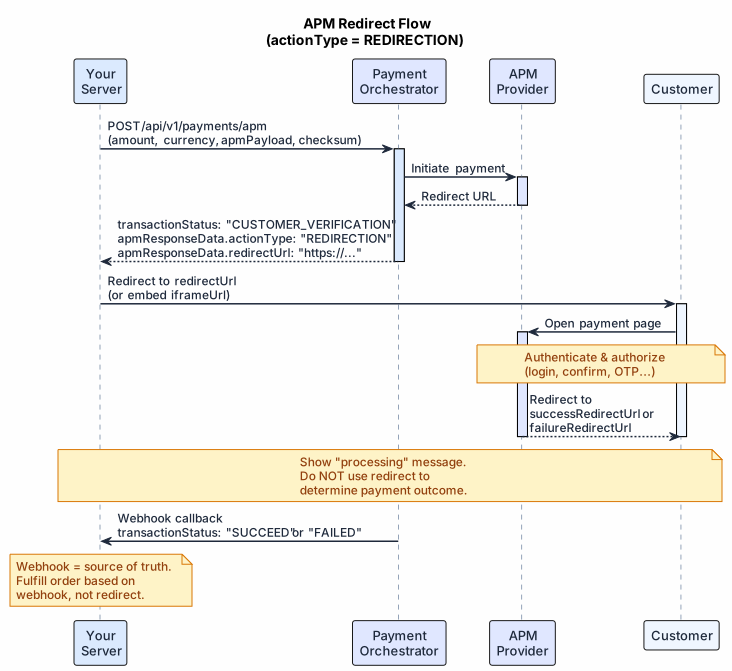
- You receive
transactionStatus: "CUSTOMER_VERIFICATION"withapmResponseData.redirectUrl(and optionallyiframeUrl) - Redirect the customer to
redirectUrl— or embediframeUrlon desktop if your UX supports it - The customer authenticates on the provider's page
- The provider redirects them back to your
successRedirectUrlorfailureRedirectUrl - You receive the final result via webhook
#Redirect vs Iframe
| Option | Best For | Consideration |
|---|---|---|
redirectUrl (full-page) | Mobile and simple integrations | Customer leaves your site temporarily |
iframeUrl (embedded) | Desktop checkout | Some providers set X-Frame-Options: DENY — always test in sandbox |
If both URLs are returned, use the iframe on desktop and fall back to redirect on mobile or if the iframe fails to load.
#Flow 2: QR Code (actionType = QR)
Used for payment methods where the customer scans a QR code with their mobile payment app (PIX, Alipay, WeChat Pay, UPI, etc.).
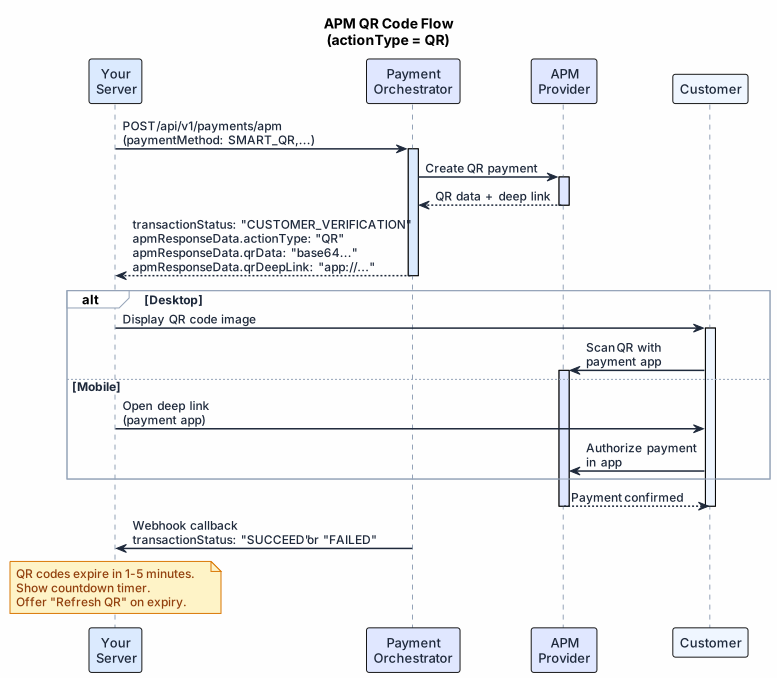
- You receive
transactionStatus: "CUSTOMER_VERIFICATION"withapmResponseData.qrData(Base64 QR image),qrDeepLink(opens payment app directly), and/orqrCodeImageUrl(pre-hosted image URL) - On desktop: display the QR code image for the customer to scan with their phone
- On mobile: use the deep link to open the payment app directly
- The customer's browser stays on your page while they pay on their phone — you must update the UI when the payment completes
- You receive the final result via webhook; push the result to the frontend via your preferred mechanism (WebSocket, SSE, or polling your own backend)
#QR Expiration
QR codes typically expire within 1–5 minutes (varies by provider). Your UI should show a countdown and offer a refresh option when expired. Never cache or reuse an expired QR.
#Flow 3: Server-to-Server (actionType = NONE)
Some APMs process entirely server-side with no customer interaction after the initial request. Common for pre-authorized bank transfers, certain voucher payments, and repeat APM transactions.
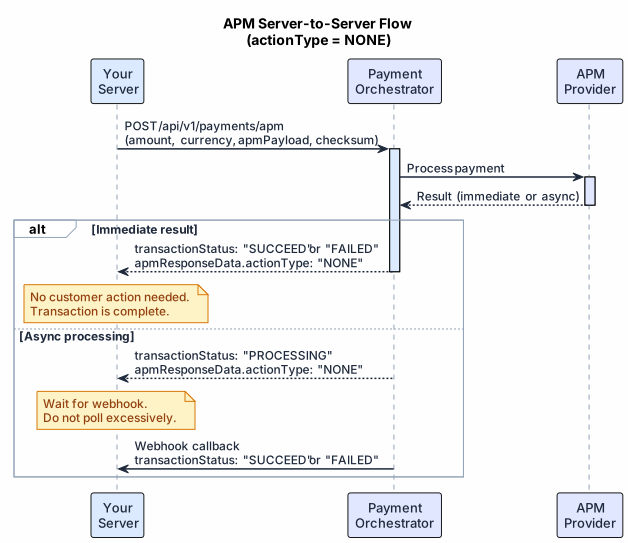
The response may be immediately final (SUCCEED or FAILED) or async (PROCESSING / PENDING). In the async case, wait for the webhook — do not poll more frequently than every 5 minutes as a fallback.
#Handling the Response (All Flows)
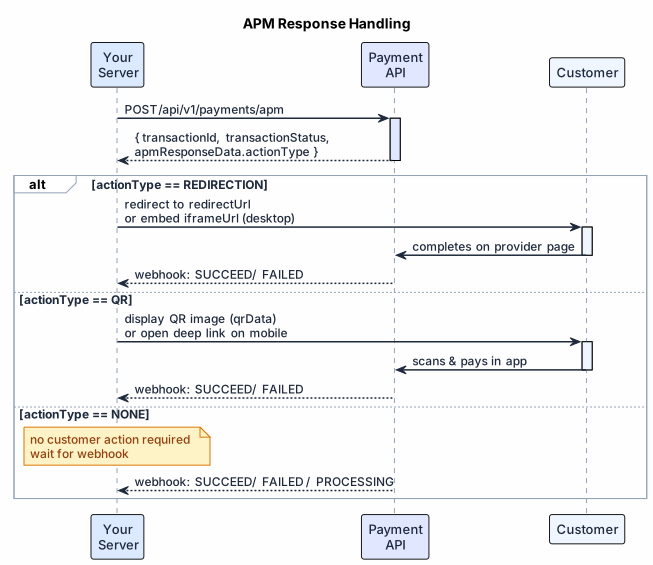
#Common Patterns
| Pattern | Recommendation |
|---|---|
| Customer closes browser mid-redirect | Webhook still arrives — always honor it |
| QR code expires before scanning | Show "Refresh QR" button, retry with new request |
| S2S payment stuck in PROCESSING | Wait for webhook; poll status after 5 min as fallback |
| Provider returns both redirectUrl and iframeUrl | Use iframe on desktop, redirect on mobile |
| Multiple webhooks for same transaction | Idempotent handler — process only the first terminal status |
| Redirect URL says success but webhook says FAILED | Trust the webhook. |
#Related
- API Reference: POST /api/v1/payments/apm — Full endpoint spec, Try It
- Processing the Response — Detailed response fields
- Handling the Callback — Full webhook schema
- QR Payments (SMART_QR) — QR-specific methods and payload
- Checksum Authentication — HMAC verification for requests and callbacks
- APM Payload References — All supported payment methods