Webhook Callback Overview
Handle async notifications and transaction lifecycle events
3 min readUpdated May 18, 2026
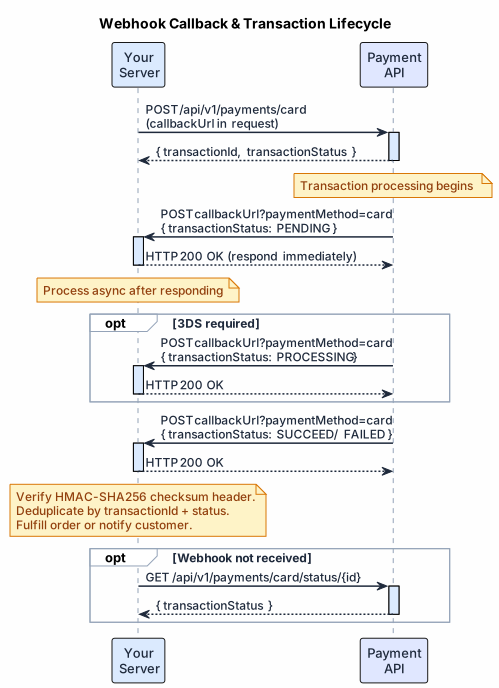
After a transaction is processed, Exirom sends a webhook callback to the callbackUrl you specified in the request — an HTTP POST containing the final transaction state. Listen for these callbacks to update records and trigger post-payment actions such as order fulfillment or customer notification.
#Callback Payload Fields
| Field | Type | Description |
|---|---|---|
transactionId | String | Unique identifier of the transaction (same as returned in the initial response). |
requestId | String | The original request ID provided when the transaction was initiated. |
mid | String | Merchant ID that the transaction is associated with. |
transactionStatus | String | Final status of the transaction (e.g., SUCCEED, FAILED, PENDING, REFUNDED). |
declineCode | Integer | Decline code if the transaction failed (provides reason for failure), otherwise null for successful transactions. |
cardMask | String | Masked card number used (e.g., "4111********1111"). |
cardHolder | String | Cardholder name (if available). |
orderCurrency | String | Currency of the original order (from the request). |
processedCurrency | String | Currency in which the transaction was processed (may differ if conversion happened). |
orderAmount | Double | The amount requested in the original order currency. |
processedAmount | Double | The amount that was actually processed in the processed currency. |
conversionRate | Double | The conversion rate applied if currency conversion occurred (otherwise 1.0). |
callbackUrl | String | The URL on your server that received this callback (echoed back for reference). |
billingDetails | Object | A subset of billing details (e.g., name, country, email) associated with the transaction. |
order | Object | A subset of order details (e.g., orderId, title) associated with the transaction. |
createdAt | String | Timestamp when the transaction was created (ISO 8601 format). |
#Callback Headers
| Header | Description |
|---|---|
X-Checksum | Signature used to verify callback authenticity. See Webhook Best Practices. |
X-Error-Code-Description | Optional decline description. Sent only for enabled merchants when transactionStatus is FAILED, declineCode is present, and a decline reason is available. |
Upon receiving a SUCCEED callback, fulfill the order. If FAILED, notify the customer or prompt a retry with a different payment method.
#Next Steps
- Callback Identification — routing Card vs APM vs HPP callbacks using
paymentMethodandapmType - Webhook Best Practices — signature verification, deduplication, out-of-order handling, polling fallback
- Callback Retry Mechanism — retry schedule and backoff behavior
Was this helpful?