APM Identity Verification
Identity verification requested by a payment or payout, and how to complete it.
Certain payment methods require the customer's identity data before a payment or payout can be completed. The transaction remains open until that data is submitted.
Such a transaction is identified by a single field: apmResponseData.actionType is KYC_REQUIRED.
The verification belongs to the transaction that requested it: the submitted data continues that payment or payout. The outcome is delivered as for any other transaction, through the callback and the transaction status.
On the hosted payment page the verification is handled for you. On a direct S2S integration you present a form and submit the data to the KYC endpoint of that transaction.
#Hosted Payment Page Integration
The hosted page displays the verification form, submits the data and continues the same transaction. No change to your integration is required: the hosted page takes the customer through the payment method's next step, as it does for a transaction that requires no verification.
#Direct S2S Integration
The transaction returns actionType: KYC_REQUIRED, iframeUrl with a hosted verification form for that customer, and in most cases customerInstructionsByLanguage. transactionStatus is CUSTOMER_VERIFICATION, a status that also covers other customer actions such as the redirect of APM Data Collection; branch on the action type.
{
  "requestId": "00000000-0000-4000-8000-000000000001",
  "transactionId": "123456789",
  "transactionStatus": "CUSTOMER_VERIFICATION",
  "paymentType": "APM",
  "apmResponseData": {
    "paymentMethod": "PAY_ID",
    "paymentType": "BANK_TRANSFER",
    "actionType": "KYC_REQUIRED",
    "iframeUrl": "https://...",
    "customerInstructionsByLanguage": {
      "en": "Identity verification is required to continue this payment. Complete the form and submit your identity document."
    }
  }
}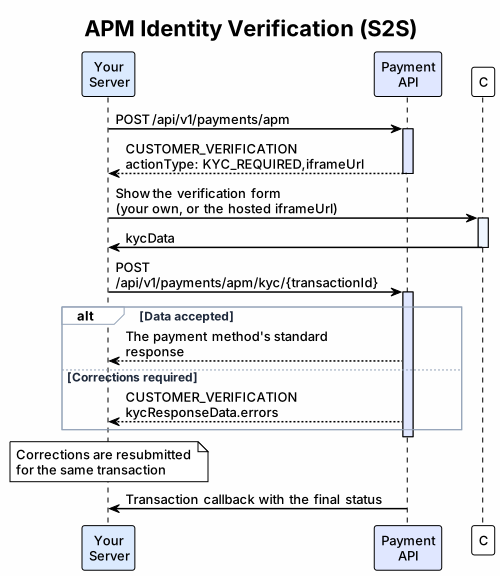
Regardless of the form presented to the customer, the data is submitted in a single server-side call: Complete APM Payment KYC for a payment, Complete APM Payout KYC for a payout, with the transactionId of the waiting transaction. A successful call returns the payment method's standard response, which is handled as the initial response of that method.
Two options are available for the form: your own, or the hosted form.
#Option 1: Your Own Form
Collect the data in your own interface and submit it as kycData to the same endpoint. Contact your account manager for the fields your account is required to collect; the request body and the constraints of each field are documented in the API reference of the payment and payout endpoint.
- Identity documents are collected as images in your form and submitted through your server, in the format the request body defines.
- The response determines the next step: corrections in
kycResponseData.errors, or the continued transaction. See Verification Result. - Display each error next to the field given in
fieldand submit the corrected data for the same transaction.
{
  "kycData": {
    "person": {
      "firstName": "Alex",
      "lastName": "Example",
      "dateOfBirth": "1990-05-01",
      "gender": "FEMALE"
    },
    "address": {
      "line1": "1 Example Street",
      "city": "Sydney",
      "state": "NSW",
      "postcode": "2000",
      "country": "AU"
    },
    "documents": [
      {
        "type": "DRIVING_LICENCE",
        "country": "AU",
        "number": "EXAMPLE123",
        "images": [
          { "side": "FRONT", "contentType": "image/png", "data": "iVBORw0KGgo..." },
          { "side": "BACK", "contentType": "image/png", "data": "iVBORw0KGgo..." }
        ]
      }
    ]
  }
}#Option 2: Our Verification Form
Embed the returned iframeUrl. The hosted form requests the data required by the payment method and validates it before submission, so your page maintains no field list of its own.
The form runs in an iframe on your page and communicates with it through browser messages (window.postMessage), each of the shape { type, payload }. The exchange:
- The customer completes the form and submits it. The form sends your page a
KYC_SUBMITmessage containing the collectedkycData. - Your page forwards that
kycDatato your server. - Your server calls the KYC endpoint with the stored
transactionIdand returns the response to your page. - Your page returns that response to the form as
KYC_RESULT, or your own error text asKYC_ERROR. This re-enables the form; until then the Submit button remains disabled.
| Direction | type | payload | Form behaviour |
|---|---|---|---|
| Form → page | KYC_SUBMIT | { kycData } — ready to send as the request body of the KYC endpoint | Submit stays disabled until your page replies |
| Page → form | KYC_RESULT | The HTTP 200 response body of the KYC endpoint | With kycResponseData.errors: shows each error and enables Submit again. On an accepted result: stays locked, so replace the form with your result screen. |
| Page → form | KYC_ERROR | { errorMessage, subErrors[] } — your own message per HTTP status | Shows the subErrors messages, otherwise errorMessage, above the form, or a general "check the data" message when the payload carries plain text only; enables Submit again |
| Page → form | KYC_LANGUAGE | { lang } | Switches the form language and keeps the entered data |
Send KYC_RESULT for every HTTP 200 response. Once a result is accepted, replace the form with the transaction result.
A 422 indicates that the transaction already has a result: read its status and display that instead. For any other error status, send KYC_ERROR with your own errorMessage, selected by HTTP status; 400, 401, 403 and 404 indicate conditions that only your integration can resolve, so direct the customer to your support. Retain the platform error body on your side: its errorMessage is intended for your integration, and traceId belongs in your logs.
Iframe Embedding
Use iframeUrl as returned and add query parameters:
| Parameter | Required | Description |
|---|---|---|
parentOrigin | Yes | Exact origin of the page that holds the iframe, for example https://shop.example.com. Only https:// is accepted; include the port when it differs from 443, and pass the origin alone. |
lang | No | Form language: en, es or pt. A regional tag such as pt-BR uses its language; anything else falls back to English. |
text, background, accent, accentHover, accentActive, accentText, label, inputText, inputBackground, border, borderHover, borderFocus | No | Theme colours, each a CSS colour (URL-encode # as %23). Invalid values are ignored. |
A valid parentOrigin is required for the form to operate. With any other value it displays "This verification form must be opened by the payment page." and the Submit button remains disabled.
Allocate the full width of your checkout column to the iframe, with a height of at least 730 px, or 1000 px on screens narrower than 600 px. In a smaller frame the form scrolls within it.
Permit the iframeUrl origin in your Content Security Policy frame-src; the form embeds its own font and loads all resources from that origin. Set referrerPolicy="no-referrer". A sandbox attribute must include allow-scripts, allow-forms and allow-same-origin.
const iframeUrl = kycRequired.apmResponseData.iframeUrl;

const iframe = document.getElementById('kyc-form');
const formUrl = new URL(iframeUrl);
const formOrigin = formUrl.origin;
formUrl.searchParams.set('parentOrigin', window.location.origin);
formUrl.searchParams.set('lang', 'en');
iframe.src = formUrl.toString();

const reply = (type, payload) => iframe.contentWindow.postMessage({ type, payload }, formOrigin);

const TRY_AGAIN = 'We could not confirm the verification. Please submit again.';
const CONTACT_SUPPORT = 'We cannot verify your identity right now. Please contact support.';
const ERROR_MESSAGES = {
  400: CONTACT_SUPPORT,
  401: CONTACT_SUPPORT,
  403: CONTACT_SUPPORT,
  404: CONTACT_SUPPORT,
  413: 'We could not upload the photos. Please try again with a different photo.',
  503: TRY_AGAIN,
  504: TRY_AGAIN,
};

window.addEventListener('message', async (event) => {
  if (event.origin !== formOrigin || event.source !== iframe.contentWindow) return;
  if (event.data?.type !== 'KYC_SUBMIT') return;

  try {
    const response = await fetch('/checkout/kyc', {
      method: 'POST',
      headers: { 'Content-Type': 'application/json' },
      body: JSON.stringify({ kycData: event.data.payload.kycData }),
    });
    const body = await response.json().catch(() => ({}));
    if (response.status === 422) {
      showTransactionStatus();
      return;
    }
    if (!response.ok) {
      logForSupport(response.status, body.internalCode, body.traceId);
      reply('KYC_ERROR', { errorMessage: ERROR_MESSAGES[response.status] ?? CONTACT_SUPPORT });
      return;
    }
    reply('KYC_RESULT', body);
    if (!body.kycResponseData) showTransactionResult(body);
  } catch {
    reply('KYC_ERROR', { errorMessage: TRY_AGAIN });
  }
});
kycRequired is the response that returned KYC_REQUIRED. /checkout/kyc is your own server endpoint: it forwards the body to the KYC endpoint of the stored transaction and returns the HTTP status and body unchanged. showTransactionStatus, showTransactionResult and logForSupport are your own.
#Verification Result
The call returns one of five outcomes.
#Corrections Required
kycResponseData.errors is present and transactionStatus is still CUSTOMER_VERIFICATION. The transaction remains open: display the messages, let the customer correct the data and submit it again for the same transaction.
{
  "requestId": "original-payment-request",
  "transactionId": "123456789",
  "transactionStatus": "CUSTOMER_VERIFICATION",
  "paymentType": "APM",
  "kycResponseData": {
    "errors": [
      {
        "code": "KYC_INVALID_IMAGE",
        "field": "documents[0].images[0].data",
        "messagesByLanguage": {
          "en": "Upload a valid JPEG, PNG, GIF, WEBP or BMP image.",
          "es": "Sube una imagen JPEG, PNG, GIF, WEBP o BMP válida.",
          "pt": "Envie uma imagem JPEG, PNG, GIF, WEBP ou BMP válida."
        }
      },
      {
        "code": "KYC_INVALID_FIELD",
        "field": "person.dateOfBirth",
        "messagesByLanguage": {
          "en": "Enter a valid date of birth. You must be at least 18 years old.",
          "es": "Introduce una fecha de nacimiento válida. Debes tener al menos 18 años.",
          "pt": "Informe uma data de nascimento válida. Você deve ter pelo menos 18 anos."
        }
      }
    ]
  }
}
Each error carries a customer-facing message in messagesByLanguage (en, es, pt) and a field. Display it next to that field, or above the form when field is null, which denotes an error concerning the submission as a whole. The messages describe the problem in text; submitted values are excluded from them.
#The Transaction Continued
The identity data was accepted and apmResponseData carries the payment method's standard response. Handle it as the initial response of that method. For a payout, await the final status.
{
  "requestId": "original-payment-request",
  "transactionId": "123456789",
  "transactionStatus": "PROCESSING",
  "paymentType": "APM",
  "apmResponseData": {
    "paymentMethod": "PAY_ID",
    "paymentType": "BANK_TRANSFER",
    "actionType": "REFERENCE",
    "providerTransactionId": "payment-1",
    "references": [
      { "key": "bankName", "label": "Bank", "value": "Example Bank" },
      { "key": "accountHolder", "label": "Account holder", "value": "Example Holder" },
      { "key": "accountNumber", "label": "Account number", "value": "00123456" },
      { "key": "payidReference", "label": "Payment reference", "value": "A4K9PX" }
    ],
    "customerInstructionsByLanguage": {
      "en": "## How to pay\n\n1. Open your banking app and create a new transfer to the account shown.\n2. Enter the displayed amount in AUD.\n3. Enter the payment reference exactly as shown in the transfer description.\n4. Confirm the transfer.\n\nYou will be redirected back to the merchant as soon as we receive your payment."
    }
  }
}#Declined by the Verification
transactionStatus is FAILED with a verification decline code. The verification terminated this transaction; display customerInstructionsByLanguage, and the customer may start a new transaction. The Decline Codes Reference lists every verification decline.
- 4035
KYC_IN_PROGRESS— the verification is under manual review. Every new payment and payout of that customer is declined with 4035 until the review ends, and no callback announces its end, so direct the customer to come back later. - 4036
KYC_REJECTED— the verification was rejected. A new payment or payout opens the form again for corrected data.
{
  "requestId": "original-payment-request",
  "transactionId": "123456789",
  "transactionStatus": "FAILED",
  "declineCode": 4036,
  "paymentType": "APM",
  "apmResponseData": {
    "paymentMethod": "PAY_ID",
    "paymentType": "BANK_TRANSFER",
    "actionType": "NONE",
    "customerInstructionsByLanguage": {
      "en": "Your identity verification was rejected. Return to the merchant and start a new payment to submit corrected details and documents."
    }
  }
}#Declined by the Transaction
transactionStatus is FAILED with any other decline code. The identity data was accepted; the transaction itself was declined. Handle it as any other decline — see the Decline Codes Reference. The example below carries 81 GATEWAY_LIMIT_EXCEEDED, returned when the provider has no receiving account available for the moment.
{
  "requestId": "original-payment-request",
  "transactionId": "123456789",
  "transactionStatus": "FAILED",
  "declineCode": 81,
  "paymentType": "APM",
  "apmResponseData": {
    "paymentMethod": "PAY_ID",
    "paymentType": "BANK_TRANSFER",
    "actionType": "NONE"
  }
}#An Error Status
The call returned an HTTP error instead of a transaction result. Follow the status table of the payment or payout endpoint, and report an unconfirmed result as unconfirmed.
{
  "httpStatus": 400,
  "internalCode": "common-4001",
  "errorMessage": "Input fields contain errors",
  "traceId": "7f006775-04b5-4f81-8250-a85ffb976722",
  "subErrors": [
    {
      "objectName": "apmKycRequest",
      "fieldName": "kycData",
      "rejectedValue": null,
      "message": "must not be null"
    }
  ]
}#Security Requirements
- Treat
iframeUrlas a confidential link: any party holding it can open the form in its own page with its ownparentOriginand receive the data the customer enters. Restrict it to the path from your server to that customer's browser, and exclude it from logs, analytics and support tickets.parentOrigindetermines where the form sends its messages. - On your page, accept a message only when
event.originmatches the origin ofiframeUrlandevent.sourceis your iframe'scontentWindow. - The form accepts messages only from
parentOriginand fromwindow.parent. - Pass the
iframeUrlorigin as the target origin ofpostMessage. - Use the
transactionIdstored by your server when the transaction returnedKYC_REQUIRED, and call the KYC endpoint with merchant credentials held on your server. - Submit identity documents from your server. Exclude them from browser storage, analytics and logs, and exclude tokens, credentials and customer data from the form URL.