3D Secure Authentication
Complete guide to 3DS2 authentication — frictionless and challenge flows, device data, liability shift, and testing
3D Secure (3DS) is a security protocol that adds an authentication step to card-not-present transactions. The cardholder's issuing bank verifies their identity before approving the payment — reducing fraud and shifting chargeback liability from the merchant to the issuer.
Exirom supports 3DS2 (the current EMV standard), which enables frictionless authentication for low-risk transactions and challenge flows for higher-risk ones.
#How It Works
3DS operates across three domains defined by the EMV 3DS protocol:
| Domain | Party | Role |
|---|---|---|
| Acquirer | The acquiring bank / PSP processing the transaction | Initiates the authentication request |
| Issuer | Cardholder's bank (Access Control Server) | Evaluates risk, decides frictionless or challenge |
| Interoperability | Card networks (Visa Secure, Mastercard Identity Check, etc.) | Routes messages between acquirer and issuer via the Directory Server |
#Where Exirom Fits
Exirom is a payment orchestrator — it sits between your application and the underlying acquirers/PSPs. Depending on the routing configuration and the capabilities of the downstream processor:
- Exirom initiates 3DS when the acquirer/PSP supports receiving pre-authenticated transactions (with CAVV/ECI data).
- The acquirer/PSP initiates 3DS when their API only accepts card credentials and handles authentication internally.
In both cases, the flow from your perspective is the same — you send the payment request to Exirom, and the response tells you whether a challenge is needed. Exirom abstracts the 3DS complexity regardless of who initiates it.
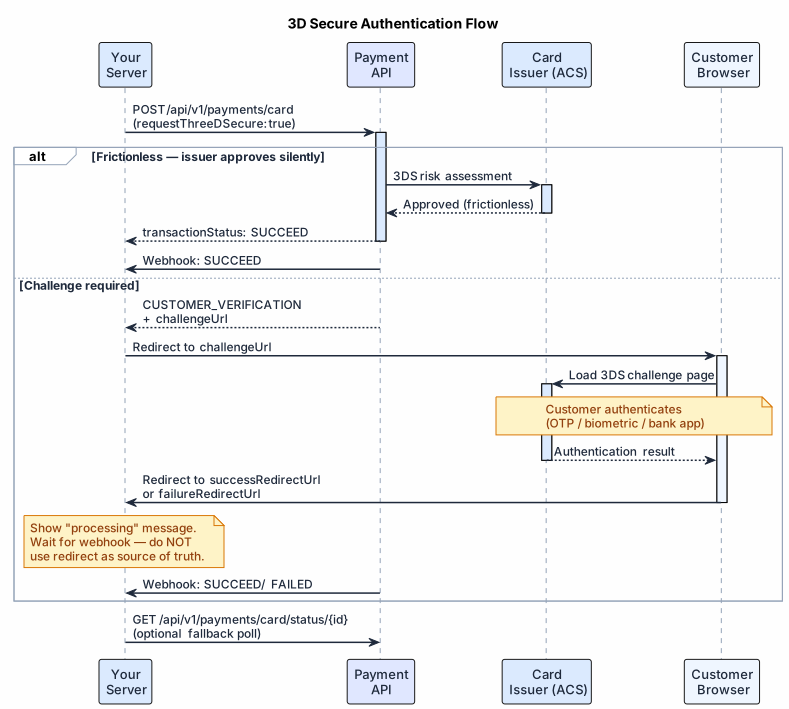
#Flow Diagram
#The Two Flows
#Frictionless Flow (Best Case)
The issuer silently authenticates the cardholder using risk-based analysis — no customer interaction needed:
- You submit payment request with device + billing data
- The 3DS authentication happens behind the scenes (issuer evaluates device fingerprint, transaction history, billing match)
- Issuer approves → transaction proceeds immediately
- You receive webhook with
transactionStatus: "SUCCEED"
No redirect. No challenge page. No customer friction. The more data you provide, the higher your frictionless approval rate.
Edge cases in frictionless flows:
In practice, "frictionless" doesn't always mean zero redirect. Some issuers return a
challengeUrleven for frictionless approvals. Two variations we've seen in production:
- Silent challenge page: The response includes
CUSTOMER_VERIFICATION+challengeUrl, but when the customer opens the page, authentication completes automatically — no OTP or input required. The page redirects back immediately. You should still redirect the customer in this case.- Callback without redirect: The response includes
CUSTOMER_VERIFICATION+challengeUrl, but the webhook arrives withSUCCEEDbefore the customer is redirected. The issuer approved silently despite returning a challenge URL. Your webhook handler should accept this — if you receive aSUCCEEDcallback, honor it regardless of whether the customer completed the redirect.Both cases reinforce why the webhook is the only source of truth, not the redirect outcome.
#Challenge Flow
When the issuer needs active verification (OTP, biometric, banking app):
- You submit payment request
- Response returns
transactionStatus: "CUSTOMER_VERIFICATION"withchallengeUrlandchallengeUrlIframe - You redirect customer to
challengeUrl(or embedchallengeUrlIframe) - Customer authenticates with their bank
- Customer's browser redirects to your
successRedirectUrlorfailureRedirectUrl - You receive webhook with final
transactionStatus: "SUCCEED"or"FAILED"
The webhook callback is the ONLY reliable source of the transaction result. Never rely on the redirect URL to determine payment outcome — network issues, browser crashes, or ad blockers can prevent the redirect from completing. Always wait for the webhook.
#Step-by-Step Implementation
#1. Submit the Payment
Include device data, billing details, and redirect URLs in your payment request:
{
  "requestId": "req_3ds_001",
  "mid": "merchant_123",
  "amount": "49.99",
  "currency": "USD",
  "card": {
    "number": "4111111111111111",
    "expMonth": "12",
    "expYear": "2028",
    "cvv": "123",
    "cardHolderName": "John Doe",
    "requestThreeDSecure": true
  },
  "lang": "en",
  "billingDetails": {
    "externalUserId": "user-001",
    "firstName": "John",
    "lastName": "Doe",
    "email": "john@example.com",
    "phone": "+12125551234",
    "address1": "123 Main St",
    "city": "New York",
    "state": "NY",
    "country": "US",
    "postalCode": "10001",
    "dateOfBirth": "1990-01-15"
  },
  "order": {
    "orderId": "ord-001",
    "title": "Product Purchase"
  },
  "device": {
    "ip": "203.0.113.42",
    "userAgent": "Mozilla/5.0 ...",
    "accept": "text/html,application/json",
    "acceptLanguage": "en-US,en;q=0.9",
    "javaEnabled": false,
    "javaScriptEnabled": true,
    "deviceLanguage": "en",
    "colorDepth": "24",
    "screenHeight": "1080",
    "screenWidth": "1920",
    "deviceTimezone": "America/New_York"
  },
  "successRedirectUrl": "https://yoursite.com/payment/success",
  "failureRedirectUrl": "https://yoursite.com/payment/failure",
  "callbackUrl": "https://yourserver.com/webhooks/payment"
}#2. Check the Response
// Frictionless — no redirect needed
{
  "transactionId": "txn_abc123",
  "transactionStatus": "SUCCEED",
  "challengeUrl": null
}

// Challenge required — redirect the customer
{
  "transactionId": "txn_abc123",
  "transactionStatus": "CUSTOMER_VERIFICATION",
  "challengeUrl": "https://acs.issuerbank.com/3ds/challenge?id=xyz",
  "challengeUrlIframe": "https://acs.issuerbank.com/3ds/challenge?id=xyz&iframe=true"
}#3. Handle the Challenge (if required)
Option A: Full-page redirect (recommended for mobile)
if (response.transactionStatus === 'CUSTOMER_VERIFICATION') {
  window.location.href = response.challengeUrl;
}
Option B: Iframe embed (better desktop UX)
<iframe
  src="https://acs.issuerbank.com/3ds/challenge?id=xyz&iframe=true"
  width="500"
  height="600"
  style="border: none;"
></iframe>
Recommended iframe sizes: 250x400, 390x400, 500x600, 600x400, or fullscreen.
Do not add the
sandboxattribute to the iframe — the issuer's content may fail to load.
#4. Customer Returns
After authentication, the customer's browser redirects to your successRedirectUrl or failureRedirectUrl. Show a "processing" message while you wait for the webhook.
Do NOT use the redirect URL to determine payment outcome. The redirect is for UX only. The customer may close the browser, lose connectivity, or be blocked by an ad blocker before the redirect completes. Your backend must rely solely on the webhook callback.
If using iframe, the iframe navigates to your redirect URL. Use postMessage to notify the parent window:
// Inside your redirect page (loaded in iframe)
// Replace 'https://yoursite.com' with your actual domain — never use '*' in production
window.parent.postMessage({
  type: '3ds-complete',
  transactionId: new URLSearchParams(location.search).get('transactionId')
}, 'https://yoursite.com');#5. Process the Webhook (Source of Truth)
The webhook callback is the only authoritative source of the transaction result:
{
  "transactionId": "txn_abc123",
  "transactionStatus": "SUCCEED",
  "declineCode": null
}| Status | Meaning | Action |
|---|---|---|
SUCCEED | Payment approved after successful authentication | Fulfill the order |
FAILED | Authentication failed or payment declined | Show error, offer retry |
PENDING | Rare — transaction still processing after 3DS | Wait for webhook with final status |
PROCESSING | Rare — transaction still processing after 3DS | Wait for webhook with final status |
Critical: Your payment processing logic must be driven by webhooks, not redirects. Implement your webhook handler before going live.
See Webhook Best Practices for handling guidance.
#Liability Shift
When 3DS authentication succeeds, liability for fraudulent chargebacks shifts from the merchant to the card issuer:
- With 3DS: If a fraud-related chargeback occurs, the issuer bears the cost — not you.
- Without 3DS: You are liable for fraud-related chargebacks.
Liability shift applies when:
- 3DS authentication was attempted and succeeded
- The transaction was processed with valid authentication data (CAVV/ECI)
Note: Liability shift covers fraud disputes only. It does not cover service/product disputes (e.g., "item not received"). You must still respond to all dispute inquiries.
#Maximizing Frictionless Approval
The more data you provide, the higher the chance the issuer approves without a challenge. Here's what matters most:
#High-Impact Fields (always send these)
| Field | Why It Matters |
|---|---|
billingDetails.email | Issuer can verify against cardholder profile |
billingDetails.phone | Used for risk scoring |
billingDetails.firstName + lastName | Matched against card records |
billingDetails.address1 + postalCode | AVS (Address Verification) check |
device.ip | Geolocation + risk scoring |
device.userAgent | Device fingerprinting |
All device.* fields | Browser fingerprint for ACS risk model |
#Additional Fields That Help
| Field | Impact |
|---|---|
billingDetails.dateOfBirth | Age verification for certain issuers |
billingDetails.country | Geographic risk assessment |
kycVerified | Tells the issuer you've verified the customer |
previousPaymentCount | Returning customers score lower risk |
Frictionless rate tip
#Collecting Device Data
Use this JavaScript snippet to collect all required device fields from the customer's browser:
function collectDeviceData() {
  return {
    ip: null, // Set server-side from the request IP
    userAgent: navigator.userAgent,
    accept: 'text/html,application/xhtml+xml,application/xml;q=0.9,*/*;q=0.8',
    acceptLanguage: navigator.language || navigator.userLanguage || 'en-US',
    javaEnabled: navigator.javaEnabled ? navigator.javaEnabled() : false,
    javaScriptEnabled: true,
    deviceLanguage: navigator.language?.split('-')[0] || 'en',
    colorDepth: String(screen.colorDepth),
    screenHeight: String(screen.height),
    screenWidth: String(screen.width),
    deviceTimezone: Intl.DateTimeFormat().resolvedOptions().timeZone,
  };
}
Note: Set
device.ipon your server from the incoming request's IP address. Do not collect it client-side.
#Required Device Fields
| Field | Type | Description |
|---|---|---|
ip | String | Customer's IP address (set server-side) |
userAgent | String | Browser User-Agent string |
accept | String | Browser Accept header value |
acceptLanguage | String | Browser Accept-Language header |
javaEnabled | Boolean | Whether Java is enabled |
javaScriptEnabled | Boolean | Whether JavaScript is enabled |
deviceLanguage | String | Device language (e.g., en) |
colorDepth | String | Screen color depth (e.g., "24") |
screenHeight | String | Screen height in pixels |
screenWidth | String | Screen width in pixels |
deviceTimezone | String | Device timezone (e.g., America/New_York) |
Missing device fields will cause 3DS to fail or fall back to a less optimal authentication path.
#When to Use requestThreeDSecure
| Value | Behavior |
|---|---|
true | Request 3DS authentication. Recommended for all transactions. |
false | Skip 3DS. The issuer or card network may still force authentication if required by regulations (SCA/PSD2). |
| (omitted) | The downstream processor decides based on card network rules and risk assessment. |
Recommendation: Always set
requestThreeDSecure: true. Even when the flow is frictionless, successful 3DS provides liability shift protection.
#Sandbox Testing
Use these test card numbers to simulate different 3DS scenarios:
| Card Number | Scenario |
|---|---|
4263982640269299 | Challenge flow — returns challenge link with ACCEPT/DECLINE buttons |
4580271111111234 | Frictionless flow — redirects to success URL after short delay |
| (any other number) | Failed flow — redirects to failure URL after short delay |
Test in sandbox at
https://sandbox.api.exirom.com/apiwith your sandbox credentials. See Sandbox Testing for full details.
#Common 3DS Errors
| Scenario | Result | Fix |
|---|---|---|
Missing device fields | Authentication fails before challenge | Send all 11 device fields |
| Customer abandons challenge | Status → FAILED via webhook | Show timeout message, offer retry |
| Challenge page timeout | Status → FAILED with decline code | Check declineCode for details |
Invalid challengeUrl | Customer sees error page | Use the URL from the response, not a cached one |
| Missing redirect URLs | Customer stuck after authentication | Always include both successRedirectUrl and failureRedirectUrl |
| Relying on redirect instead of webhook | Missed payments, inconsistent state | Always use webhook as source of truth |
#Regulatory Context (SCA / PSD2)
In the European Economic Area (EEA), Strong Customer Authentication (SCA) is required by PSD2 regulation for most online card payments. 3DS2 is the primary method for SCA compliance.
When required, 3DS is enforced automatically by the card network or issuer — regardless of the requestThreeDSecure value. Exemptions exist for:
- Low-value transactions (under €30, up to 5 consecutive or €100 cumulative)
- Trusted beneficiaries (whitelisted by the cardholder)
- Recurring payments (after initial authentication)
- Merchant-initiated transactions
#See Also
Note: 3DS can also be triggered during tokenization and saved-card charges. The same challenge handling logic applies.
- Initiating a Card Payment — full payment request guide
- Webhook Best Practices — handling 3DS callbacks
- Transaction Status Guide — status lifecycle
- Sandbox Testing — test card numbers and flows
- Error Recovery — retry patterns for failed 3DS