Embedded Checkout (Web SDK)
Embed the hosted payment page, with cards and APMs, inside your own checkout page.
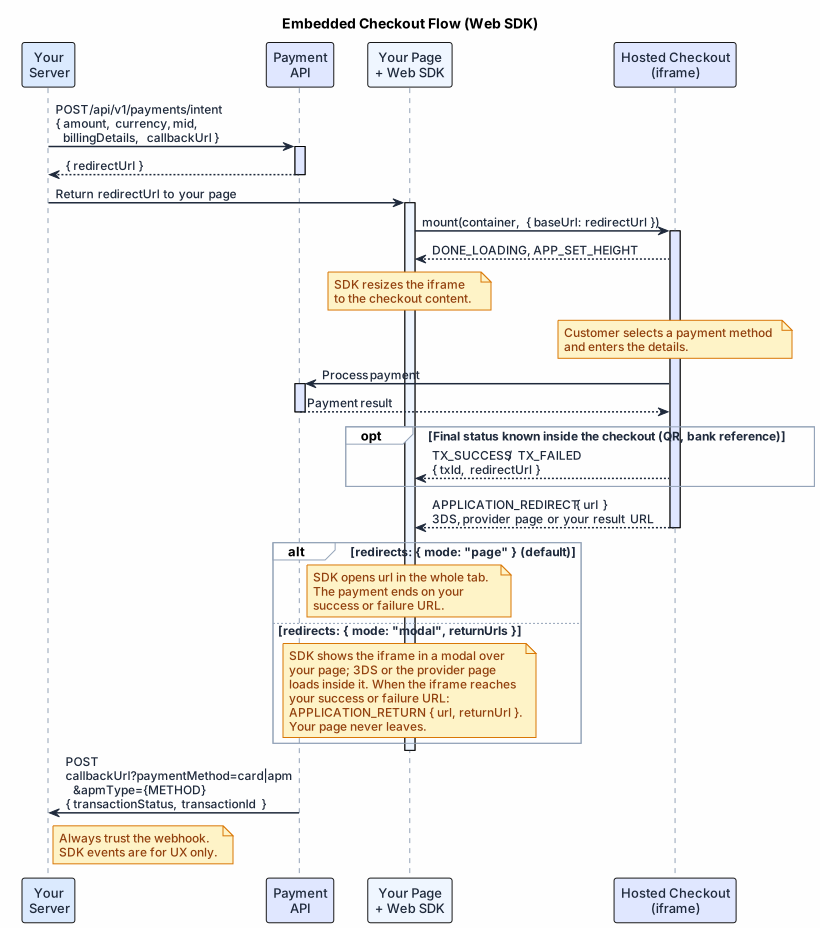
The Web SDK shows the hosted payment page inside your own page instead of redirecting the customer to it. The integration otherwise follows the HPP Flow: your server creates a payment intent, and the result arrives by webhook. The SDK replaces only the redirect step. It does four things:
- places the intent's
redirectUrlin an iframe on your page; - fits the iframe height to the content;
- handles 3D Secure and provider pages;
- reports what happens in the checkout.
The embedded page offers the same cards and APMs as the hosted page. Card data never reaches your page or your servers.
#Installation
The SDK is published to npm as @exirom/cashier-sdk. It ships in three builds:
- an ES module for bundlers;
- a CommonJS build for
require; - a browser build for a plain
<script>tag, which defines the globalCashierSdk.
The current version is 1.0.0-rc.6.
npm install @exirom/cashier-sdk@1.0.0-rc.6With the script tag, pin the exact version in the URL and keep the integrity hash of that version. To serve the script from your own domain, copy dist/index.global.js from the npm package.
Release candidates (1.0.0-rc.N) may change the API between candidates. From 1.0.0, the SDK follows semantic versioning.
#Mounting the Checkout
The checkout opens in an iframe only on the sites registered for your merchant account, so register yours first; see Page Requirements.
- Create the payment intent on your server, as in the HPP Flow, right before you show the checkout. Pass its
redirectUrlto your page. A payment intent is valid for a limited time, and its token works for one checkout. - Call
mountwith a container element or selector, and with theredirectUrlasbaseUrl. - Subscribe to the events your page needs.
mount creates the iframe immediately and returns the checkout instance. It throws when an option cannot work:
- the container is not found;
baseUrlis not an absolutehttps://orhttp://URL;- a value has the wrong type;
redirectscontradicts itself.
An unknown option only logs a warning. Pass redirectUrl exactly as received.
The SDK adds your page origin to the iframe URL as parentOrigin, so the checkout sends its messages to your page only.
import { mount } from '@exirom/cashier-sdk';

const response = await fetch('/checkout/intent', { method: 'POST' });
const { redirectUrl } = await response.json();

const cashier = mount('#cashier', { baseUrl: redirectUrl });

cashier.on('TX_SUCCESS', ({ data }) => showPendingConfirmation(data.txId));
cashier.on('CASHIER_ERROR', ({ data }) => handleCashierError(data.code));
cashier.on('ONLOAD_ERROR', ({ data }) => showRetry(data.message));
Notes on the example:
/checkout/intentis your own server endpoint. It creates the payment intent and returns itsredirectUrl.showPendingConfirmation,handleCashierErrorandshowRetryare your own functions.- With the script tag, call
CashierSdk.mountwith the same arguments.
#Options
| Option | Default | Description |
|---|---|---|
baseUrl | — | Required. The redirectUrl of the payment intent. |
redirects | { mode: "page" } | What happens when the payment continues outside the checkout. See Redirects. |
iframeOptions.autoResize | true | Sets the iframe height to the checkout content. With false, APP_SET_HEIGHT still fires and you set the height yourself. |
iframeOptions.minHeight | 520 | Minimum iframe height in pixels, kept while the checkout loads. |
timeoutMs | 15000 | Time in milliseconds to wait for the first message from the checkout before ONLOAD_ERROR. 0 disables the timeout. |
languageSelector | true | With false, the checkout hides its language switcher and shows the payment intent's lang. |
appearance | — | Colors and corner radius on top of the checkout theme. See Appearance. |
The iframe takes the full width of the container. Give the container the full width of your checkout column.
#Redirects
Some steps of a payment run outside the checkout:
- 3D Secure;
- the page of an APM provider;
- finally, your
successRedirectUrlorfailureRedirectUrl.
redirects sets what happens then. Pick one of two modes.
#Whole page (default)
With redirects: { mode: "page" }, the checkout does not open these pages inside the iframe. It sends APPLICATION_REDIRECT with the target url, and the SDK opens that URL in the whole browser tab. The customer leaves your checkout page, and the payment ends on your success or failure URL.
To navigate yourself, for example to save the state of your page first, pass onRedirect. The SDK then calls it with the URL instead of navigating. The payment cannot continue until the customer reaches that URL.
mount('#cashier', {
  baseUrl: redirectUrl,
  redirects: { mode: 'page', onRedirect: (url) => router.navigate(url) },
});#Modal, your page stays
With redirects: { mode: "modal", returnUrls }, your page never leaves:
- The checkout opens 3D Secure and provider pages inside the iframe.
- While the iframe shows such a page, the SDK shows it in a modal over your page.
- When the iframe reaches one of
returnUrls, the SDK closes the modal and sendsAPPLICATION_RETURNwith{ url, returnUrl }. Then show the result yourself.
The modal has two buttons: one continues on the full page, for providers that refuse to load in a frame, and the other closes the modal.
Pass the same URLs as the intent's successRedirectUrl and failureRedirectUrl as returnUrls.
const SUCCESS_URL = 'https://shop.example.com/payment/success';
const FAILURE_URL = 'https://shop.example.com/payment/failure';

const cashier = mount('#cashier', {
  baseUrl: redirectUrl,
  redirects: { mode: 'modal', returnUrls: [SUCCESS_URL, FAILURE_URL] },
});

cashier.on('APPLICATION_RETURN', ({ data }) => {
  showResult(data.returnUrl === SUCCESS_URL ? 'paid' : 'failed');
});
cashier.on('MODAL_CLOSE', ({ data }) => {
  if (data.reason === 'user') showResult('not completed');
});
Requirements and limits of the modal mode:
returnUrlsare absolute URLs on your page's origin. They match by origin and path; the query and hash are ignored. A return URL on another origin, even a subdomain, is not detected.- Your result pages must allow framing by your own origin (
X-Frame-Options: SAMEORIGINorContent-Security-Policy: frame-ancestors 'self'). Some frameworks sendX-Frame-Options: DENYby default. Then the customer sees a blank frame after 3D Secure, andAPPLICATION_RETURNdoes not fire. - Provider pages that forbid framing stay blank, and the customer continues with the full-page button. Use the mode when your payment methods allow framing, for example cards with 3D Secure.
- The modal is positioned against the viewport. If an ancestor of the container has
transform,filterorperspective, it is positioned against that ancestor instead. - Closing the modal (
MODAL_CLOSEwith the reasonuser) does not cancel the payment. To retry, create a new payment intent.
#Payment Result
TX_SUCCESS or TX_FAILED fires when the checkout learns the final status while it is still embedded, for example in QR and bank transfer flows. The event carries the txId and the redirectUrl the checkout opens next: your success or failure URL.
Flows that leave the checkout, such as 3D Secure and provider pages, end on your success or failure URL instead:
- in the whole-page mode, the browser tab goes there;
- in the modal mode, the SDK sends
APPLICATION_RETURN.
Do not use SDK events or redirects as payment confirmation. They serve your page's UX only. The webhook to your callbackUrl carries the final result; see HPP Webhooks.
#Errors
When the checkout shows an error page instead of the payment, it sends CASHIER_ERROR with a code:
code | What happened | What to do |
|---|---|---|
invalid_token | The checkout URL has no token, or the token is unknown, expired or already used | Create a new payment intent and mount again |
expired_token | The payment intent expired or was already used when the customer paid | Create a new payment intent and mount again |
not_found | The checkout URL points to a page that does not exist | Check baseUrl |
internal_error | The checkout hit an internal error; its page offers the customer to try again | Keep the checkout; log the code |
Do not unmount on internal_error: the "Try again" button is inside the checkout. A code that your SDK version does not know arrives as internal_error.
ONLOAD_ERROR is different: the checkout did not answer at all. Either the iframe failed to load, or no message arrived within timeoutMs, for example when a proxy returned an error page. Offer the customer to try again with reload(), or create a new payment intent.
The same event fires when your site is not registered for the embedded checkout: the browser refuses the frame, and your page cannot detect the refusal, so the SDK waits for timeoutMs. The browser console then shows a frame-ancestors error. Retrying does not help; register the site, see Page Requirements.
cashier.on('CASHIER_ERROR', ({ data }) => {
  if (data.code === 'invalid_token' || data.code === 'expired_token') {
    cashier.unmount();
    startCheckout(); // create a new payment intent on your server and mount again
  }
});#Appearance
languageSelector: false hides the language switcher. The checkout then shows the payment intent's lang.
appearance changes the look on top of the checkout theme:
| Key | Applies to |
|---|---|
colorPrimary | Pay button, input focus and hover borders, lock icon. Hover and active shades are derived. |
colorPrimaryText | Pay button text |
colorBackground | Checkout page background |
colorSurface | Form and input background |
colorText | Main text, amount and input text |
colorTextSecondary | Field labels |
colorBorder | Input borders |
borderRadius | Corner radius of buttons and inputs in pixels, from 0 to 32 |
secureBadge | false hides the "Secure Payment" line |
Colors must be #hex (3, 4, 6 or 8 digits), rgb(), rgba(), hsl() or hsla(). The checkout ignores invalid values. Logos, fonts and layout stay with the checkout theme.
mount('#cashier', {
  baseUrl: redirectUrl,
  languageSelector: false,
  appearance: {
    colorPrimary: '#6d28d9',
    colorPrimaryText: '#ffffff',
    borderRadius: 8,
    secureBadge: false,
  },
});#Events
Subscribe with cashier.on(event, handler). on returns a function that removes the handler. In TypeScript, handlers are typed by event name, and the payload types are exported, for example EventPayloads, TxResult, ReturnPage and CashierError.
| Event | Payload | When |
|---|---|---|
IS_LOADING | { data } | The SDK created the iframe, on mount and on reload() |
DONE_LOADING | { data } | The payment screen is ready; once per mount and per reload() |
ONLOAD_ERROR | { data: { message, timeoutMs? } } | The iframe failed to load, or the checkout sent nothing within timeoutMs |
CASHIER_ERROR | { data: { code } } | The checkout shows an error page and cannot take the payment |
APP_SET_HEIGHT | number | The checkout content height changed, in pixels |
TX_SUCCESS | { data: { txId?, redirectUrl } } | The payment succeeded inside the checkout |
TX_FAILED | { data: { txId?, redirectUrl } } | The payment failed inside the checkout |
APPLICATION_REDIRECT | { data: { url } } | The payment continues at url |
APPLICATION_RETURN | { data: { url, returnUrl? } } | Modal mode: the payment came back to your page |
MODAL_OPEN | { data: { url } } | Modal mode: the modal opened for a page outside the checkout |
MODAL_CLOSE | { data: { reason } } | Modal mode: the modal closed; reason is return, result, error, cashier, reload or user |
* | MessageEvent | Every message from the checkout iframe, before validation |
mount emits IS_LOADING before it returns. To receive it, pass handlers as the third argument: mount(container, options, { IS_LOADING: handler }). Handlers subscribed with on() receive it from the next reload().
DONE_LOADING fires when the checkout reports that its payment screen is ready, not on the iframe load event. Later pages inside the checkout do not fire it again. If the checkout shows an error page instead, you get CASHIER_ERROR and no DONE_LOADING.
The SDK accepts messages only from its own iframe and the checkout origin, and it validates each payload. A message that does not match its event reaches only *.
#Instance Methods
| Method | Description |
|---|---|
on(event, handler) | Subscribes to an event and returns a function that removes the handler. |
reload() | Recreates the iframe with the same URL and handlers. Returns a promise that resolves when the checkout answers, fails or times out. A payment intent works for one checkout, so after an attempt create a new intent instead. Has no effect after unmount(). |
unmount() | Removes the iframe, the message listener and all handlers. Call it when your page or component is removed. |
The package also exports version (CashierSdk.version with the script tag). Include it when you contact support.
#Page Requirements
- Registered sites: the checkout opens in an iframe only on the sites registered for your merchant account. Send the origins of the pages that show the checkout to your Account Manager before you go live. Each origin is a separate entry:
https://shop.example.comandhttps://www.shop.example.comare different sites, and so are a staging host andhttp://localhost:3000. On any other site the browser refuses the frame, and you getONLOAD_ERROR. The redirect to the hosted payment page does not depend on this list. - Content Security Policy: allow the checkout origin in the
frame-srcdirective. This is the origin ofredirectUrl, for examplehttps://checkout.exirom.com. With the script tag from jsDelivr, also allowhttps://cdn.jsdelivr.netinscript-src. - Sandbox: the checkout runs in a sandboxed iframe with
allow-forms allow-scripts allow-same-origin allow-popups allow-popups-to-escape-sandbox. It can open links and deep links in a new tab, but it cannot navigate your page. - Apple Pay: in Safari 17 and later, Apple Pay works inside the embedded checkout when the domain of your page is registered for Apple Pay domain verification. Host the domain verification file provided by Exirom at
https://{your-domain}/.well-known/apple-developer-merchantid-domain-association. See Apple Pay. - Browsers: Chrome and Edge 86+, Firefox 78+, Safari 14+ (iOS 14+).
#Related
- HPP Flow — Create the payment intent
- HPP Webhooks — Receive the payment result
- POST /api/v1/payments/intent — Full request/response reference