Authentication Flow
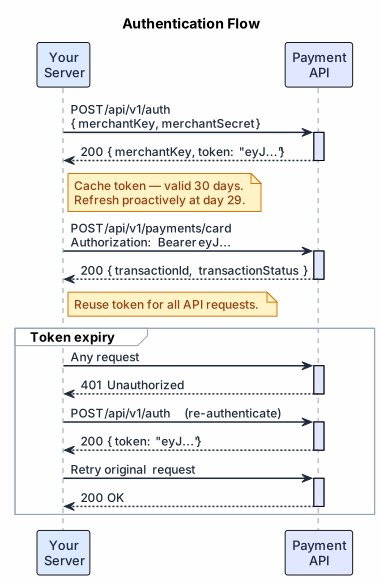
Sequence diagram and step-by-step walkthrough of the full token lifecycle, including caching and 401 recovery.
#1. Obtain Credentials
The Exirom Admin Team provides your Merchant Key and Merchant Secret. These are environment-specific — sandbox and production credentials are separate and not interchangeable.
Store credentials in environment variables or a secrets manager. Never expose them in source code, logs, or client-side code.
#2. Authenticate
Call POST /api/v1/auth with your credentials. Exirom returns a JWT token valid for 30 days.
→ POST /api/v1/auth API Reference
#3. Use the Token
Include the token in the Authorization header of every API request:
Authorization: Bearer {token}
The token is validated at the start of each request. A single token can be reused across your entire server — there is no per-request or per-session token.
#4. Token Caching
Cache the token at startup and reuse it for all requests. Do not call /auth on every API call — this adds unnecessary latency and is not required.
The token's expiry timestamp is encoded in the JWT payload. You can decode it to schedule a proactive refresh:
function getTokenExpiry(token) {
  const payload = JSON.parse(
    Buffer.from(token.split('.')[1], 'base64url').toString()
  );
  return new Date(payload.exp * 1000);
}

function scheduleRefresh(token, credentials, onRefresh) {
  const expiry = getTokenExpiry(token);
  // Refresh 1 day before expiry
  const refreshAt = new Date(expiry.getTime() - 24 * 60 * 60 * 1000);
  const delay = refreshAt.getTime() - Date.now();
  if (delay > 0) {
    setTimeout(async () => {
      const freshToken = await getToken(credentials);
      onRefresh(freshToken);
    }, delay);
  }
}#5. Token Expiry & 401 Recovery
Tokens expire after 30 days. Best practice is to refresh proactively at day 29 rather than waiting for a 401.
If a 401 Unauthorized is received mid-operation:
- Discard the cached token
- Call
POST /api/v1/authto obtain a new token - Retry the original request once
- If the retry also returns
401, surface the error — do not loop
A persistent 401 after retry indicates incorrect credentials or a revoked account — not a transient token expiry. Contact Exirom support if you cannot resolve it.
#6. Sandbox vs Production
Sandbox and production use completely separate credentials and base URLs. A sandbox token is rejected by the production environment and vice versa.
| Sandbox | Production | |
|---|---|---|
| Base URL | https://sandbox.api.exirom.com/api | https://api.exirom.com/api |
| Credentials | Sandbox key / secret | Production key / secret |
| Tokens | Not valid in production | Not valid in sandbox |
Use environment variables to switch between environments without code changes:
# Sandbox
API_BASE_URL=https://sandbox.api.exirom.com/api
MERCHANT_KEY=your_sandbox_key
MERCHANT_SECRET=your_sandbox_secret

# Production
API_BASE_URL=https://api.exirom.com/api
MERCHANT_KEY=your_production_key
MERCHANT_SECRET=your_production_secret#Related
- Quick Start: Authentication — minimal working example with code
- POST /api/v1/auth — Endpoint spec with Try It
- Going to Production — credential management checklist
- Error Handling Guide — Auth error codes and recovery