End-to-End Tutorial: Your First Payment
Build a complete card payment flow from API keys to a confirmed transaction in 15 minutes
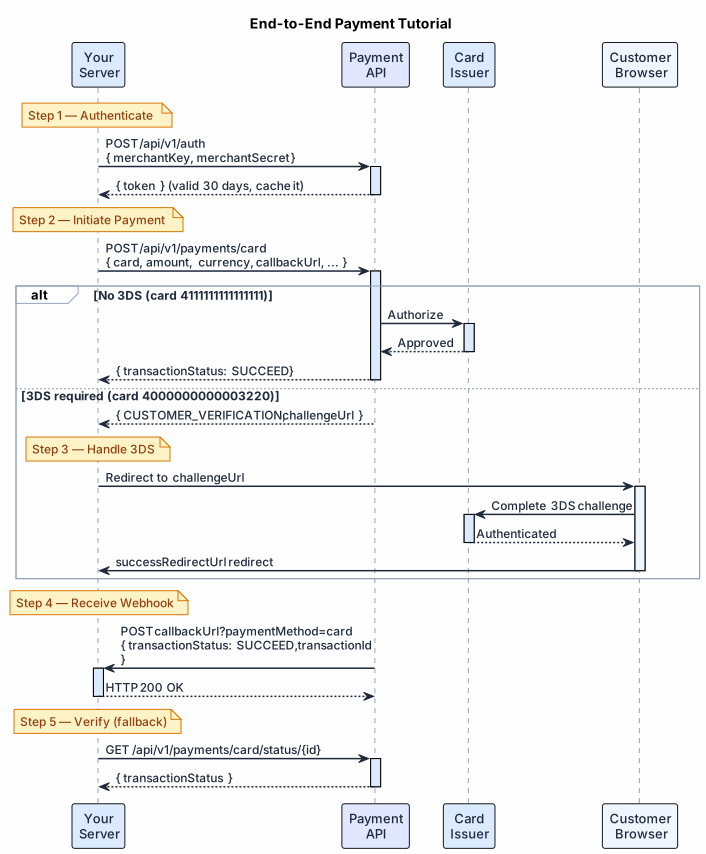
This tutorial walks through a complete card payment integration — from authentication to a confirmed payment with webhook handling. By the end you'll have working code covering the full lifecycle.
Time: ~15 minutes Environment: Sandbox Prerequisites: Sandbox credentials from your Exirom account manager
#What You'll Build
#Step 1 — Authenticate
Call POST /api/v1/auth with your merchantKey and merchantSecret. You get back a JWT token valid for 30 days — cache it and reuse it across all requests as Authorization: Bearer {token}.
For token caching and 401 retry patterns, see Authentication Flow.
#Step 2 — Initiate a Card Payment
Call POST /api/v1/payments/card with your amount, card details, billing info, and callback URLs. Use sandbox test card 4111111111111111 for a simple success (no 3DS). See the API reference for the full field list.
The response tells you what happens next:
// Successful (no 3DS)
{
  "transactionId": "733609401625775730",
  "transactionStatus": "SUCCEED",
  "declineCode": null
}
// 3DS challenge required
{
"transactionId": "733609401625775731",
"transactionStatus": "CUSTOMER_VERIFICATION",
"challengeUrl": "https://3ds.provider.com/challenge/xyz",
"challengeUrlIframe": null
}
requestIdmust be unique per transaction. It's your idempotency key — retrying with the samerequestIdreturns the original result rather than creating a duplicate. See Idempotency.
#Step 3 — Handle 3DS (if required)
If transactionStatus is CUSTOMER_VERIFICATION, redirect the customer:
const result = await initiatePayment(payload);

if (result.transactionStatus === 'CUSTOMER_VERIFICATION') {
  // Redirect to 3DS challenge page
  res.redirect(result.challengeUrl);
} else if (result.transactionStatus === 'SUCCEED') {
  // Synchronous success — fulfill the order
  await fulfillOrder(result.transactionId);
} else {
  // FAILED — show error to customer
  res.redirect('/payment/failed?code=' + result.declineCode);
}
After the customer completes the 3DS challenge, they land on your successRedirectUrl or failureRedirectUrl. The authoritative result arrives via webhook.
#Step 4 — Receive the Webhook
Exirom POSTs the final transaction status to your callbackUrl. Respond with HTTP 200 immediately, then process asynchronously.
app.post('/webhooks/payment', express.json(), async (req, res) => {
  // 1. Always respond 200 immediately
  res.status(200).send('OK');

  const { transactionId, requestId, transactionStatus, declineCode } = req.body;

  // 2. Deduplicate
  const key = `${transactionId}:${transactionStatus}`;
  if (await db.webhookLog.exists(key)) return;
  await db.webhookLog.create(key);

  // 3. Handle result
  if (transactionStatus === 'SUCCEED') {
    await db.orders.update({ requestId, status: 'paid', transactionId });
    await notifyCustomer(requestId);
  } else if (transactionStatus === 'FAILED') {
    await db.orders.update({ requestId, status: 'failed', declineCode });
  }
});
Webhook URL must be public HTTPS. During development use ngrok or webhook.site to inspect callbacks.
#Step 5 — Verify Status (optional fallback)
If the webhook doesn't arrive within a reasonable window, call GET /v1/payments/card/status/{id} to poll for the current status.
#What's Next
- Test 3DS: Use card
4000000000003220to trigger a 3DS challenge - Test decline: Use any card number not listed in Sandbox Test Data
- Add idempotency: Ensure your
requestIdis unique and persisted before the API call - Harden webhooks: Add HMAC verification, deduplication, and a polling fallback
- Go live: Follow the Production Guide checklist
#See Also
- POST /api/v1/auth — Auth endpoint spec
- POST /api/v1/payments/card — Full payment request/response reference
- GET /v1/payments/card/status/{id} — Status poll endpoint
- Sandbox Test Data — All test cards and APM flows
- 3D Secure Auth Flow — Full 3DS handling guide
- Webhook Best Practices — Production-grade webhook handling
- Integration Checklist — Track your progress to go-live