HPP Flow
One integration for cards and all APMs — HPP handles card input, 3DS, and APM selection
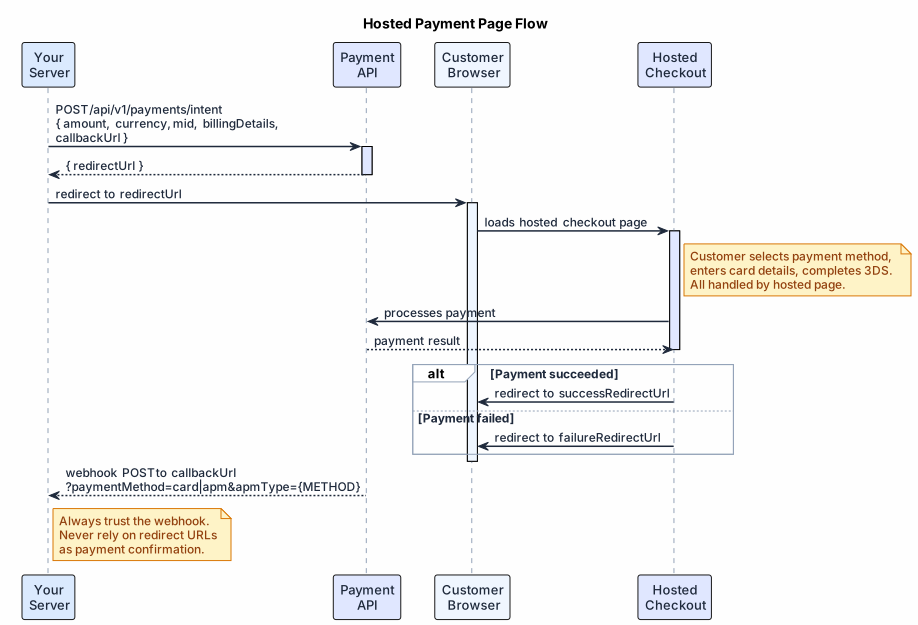
Create a payment intent, redirect the customer to Exirom's hosted checkout, and receive a webhook with the result. The HPP handles card input, APM selection, 3DS challenges, and localization — your server only needs to create the intent and handle the callback.
#1. Create a Payment Intent
Call POST /api/v1/payments/intent with your amount, currency, mid, billing details, and callback/redirect URLs. The response returns a redirectUrl.
See the API Reference for the full request schema.
#2. Redirect the Customer
Send the customer to the redirectUrl. The hosted checkout page handles everything:
- Payment method selection (cards and all APMs enabled on your account)
- Card data entry and validation
- 3D Secure challenges
- Localization and responsive layout
After the customer completes or abandons payment, they are redirected to your successRedirectUrl or failureRedirectUrl.
Do not use the redirect result as payment confirmation. The
successRedirectUrlis for UX only — always wait for the webhook.
#3. Receive the Webhook
Exirom sends a POST to your callbackUrl with the final transaction result. The paymentMethod query parameter on the URL tells you the payload format before you parse the body:
?paymentMethod=card→ card payment payload?paymentMethod=apm&apmType={METHOD}→ APM payment payload
See HPP Webhooks for routing and payload details.
#4. Retrieve Intent State (optional)
Use GET /api/v1/payments/intent?token={token} to check which APMs are available or verify intent state before redirecting. Extract token from the path segment after /pay/ in the redirectUrl.
#Related
- POST /api/v1/payments/intent — Full request/response reference
- GET /api/v1/payments/intent — Retrieve intent state
- HPP Webhooks — Callback routing and payload formats