Transaction Lifecycle Flow
How a transaction moves through statuses from creation to final outcome
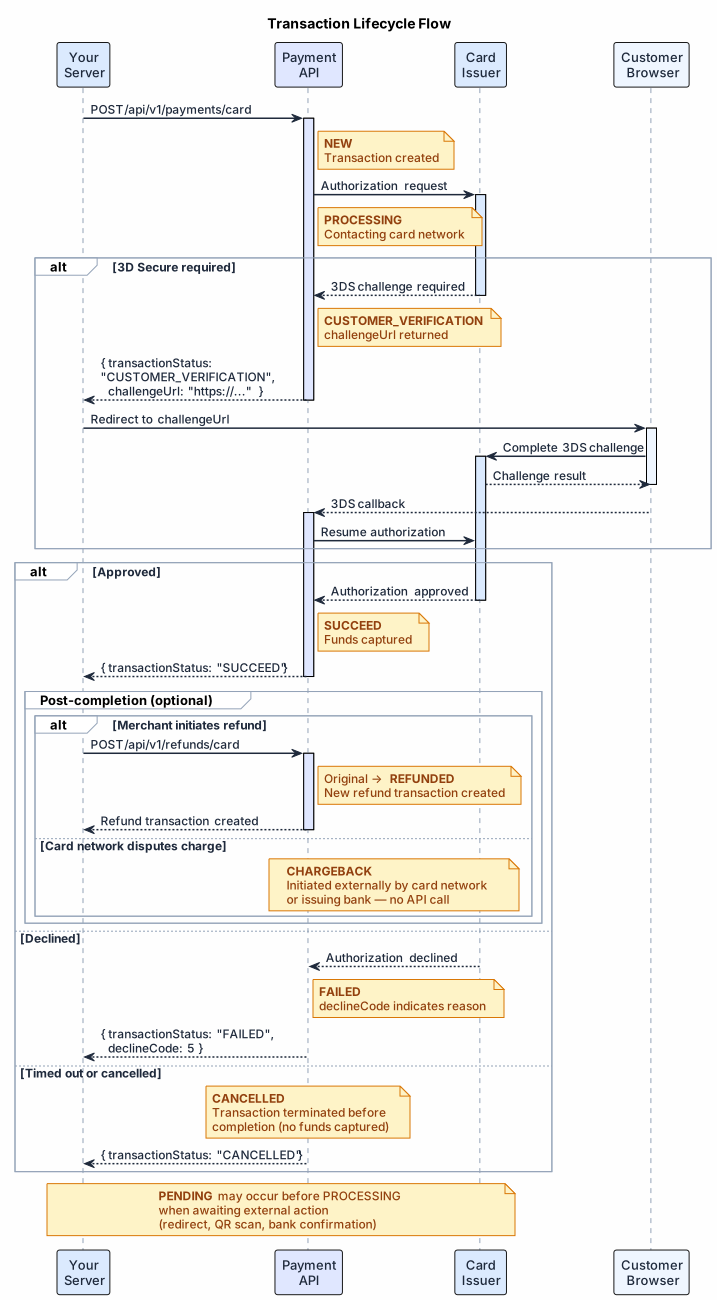
Every transaction follows a defined path through statuses. Understanding this lifecycle tells you when it is safe to act on a result and when to wait.
#Steps
#1. Submitted — NEW
You call POST /api/v1/payments/card. The transaction is created and enters NEW status. No processing has occurred yet.
#2. In progress — PENDING / PROCESSING
The transaction moves to PROCESSING as the payment network is contacted. If the customer or an external system must take action first (e.g., bank redirect, QR scan), it enters PENDING.
PENDING is not a failure. The transaction will continue once the external action completes.
#3. Customer verification — CUSTOMER_VERIFICATION
If 3D Secure authentication is required, the transaction pauses at CUSTOMER_VERIFICATION. Your application receives a challengeUrl — redirect the customer there to complete the challenge.
After the challenge, the transaction continues to SUCCEED or FAILED.
#4. Final outcome
Once processing is complete, the transaction reaches a final status (SUCCEED, FAILED, or CANCELLED) and will not change further. See Transaction Statuses for the full reference.
#5. Post-completion
A SUCCEED transaction can later transition to:
REFUNDED— you calledPOST /api/v1/refunds/cardCHARGEBACK— the card network reversed the charge externally
These are independent transactions; the original transactionId status updates to reflect them.
#Related
- Transaction Statuses — full status reference table
- Error Recovery Patterns — decision trees for stuck, failed, and ambiguous transactions
- 3D Secure Auth Flow — detailed CUSTOMER_VERIFICATION handling